
Case study
Transparent ticket progress and requestor notifications
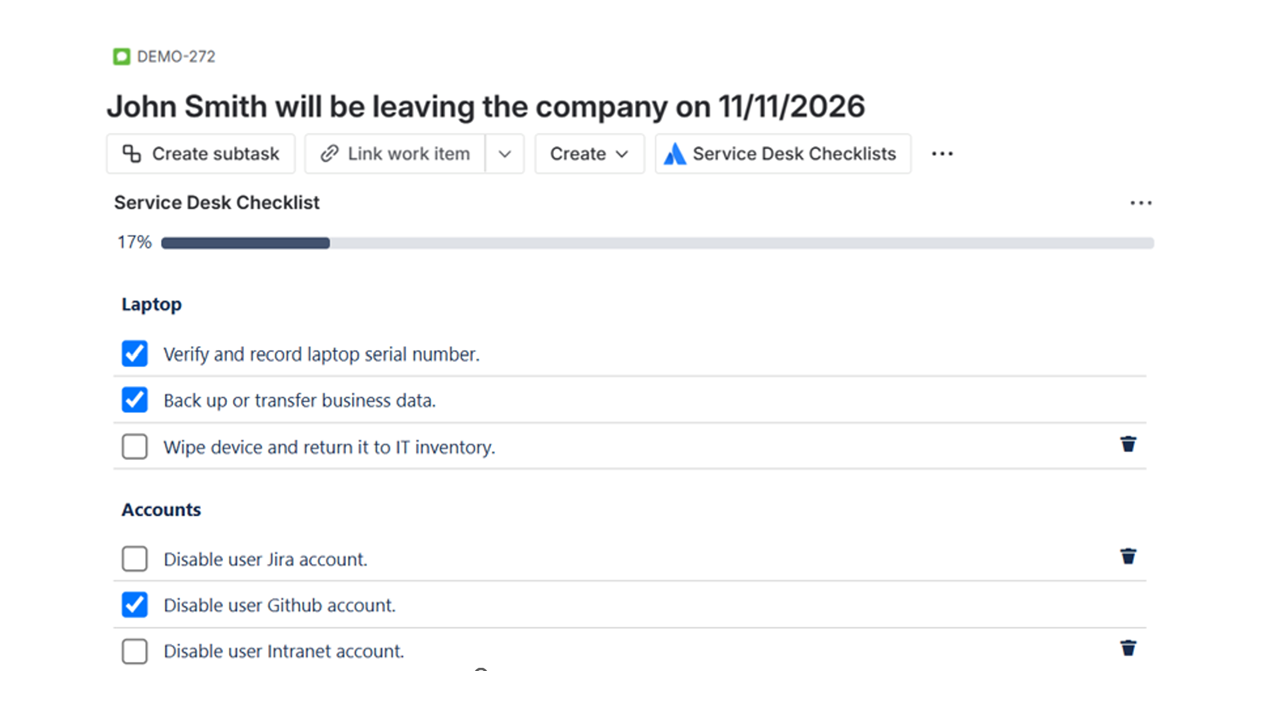
Make the service desk more transparent. When a checklist action is completed, the requestor is notified automatically—so they see progress without chasing updates. The business team stays informed and more satisfied.
- Automatic notifications to the requestor when a step is completed
- Progress visible without waiting for manual comments or emails
- Requestors know their ticket is moving—no more “silence” for days or weeks
When requestors hear nothing for days or weeks
Before introducing checklist-driven notifications, the business team was very unsatisfied. They had no way to know if their ticket was actually progressing. Without any messages for days—or even weeks in some cases—requestors felt left in the dark.
Agents were often busy completing steps, but they did not always remember to post a comment or send an update. So from the requestor’s point of view, nothing seemed to be happening. That led to repeated “What’s the status?” emails, frustration, and a perception that the service desk was unresponsive.
Typical pain points
- No visibility into progress unless the agent manually commented
- Requestors unsure whether the ticket was stuck or being worked on
- Silence for days or weeks, then a sudden resolution—with no explanation of what was done
- Business teams feeling ignored and dissatisfied with the service desk
Automatic notifications when actions are completed
With Service Desk Checklists, when an agent completes a checklist step, the requestor can be notified automatically—for example via a Jira comment or email. The system keeps the requestor informed without relying on the agent to remember to post an update every time.
- Checklist completion triggers a notification to the requestor
- Requestors see that a specific action has been completed—no guessing
- Progress is transparent: the ticket is clearly moving, step by step
- Fewer “What’s the status?” requests and higher satisfaction
Before vs. after: transparency and satisfaction
Moving from manual, ad-hoc updates to automatic progress notifications changes how the business team experiences the service desk.
Before: little or no visibility
- No messages for days or weeks
- Requestors don’t know if the ticket is progressing
- Business team very unsatisfied
- Agents must remember to comment—often they don’t
After: transparent progress and automatic updates
- Requestor notified when each action is completed
- Clear view of what’s done and what’s next
- Requestors feel informed and more satisfied
- Notifications happen automatically—no reliance on manual comments
How progress notifications work
Checklist completion is recorded in the ticket and can trigger notifications so the requestor stays in the loop.
Request created
The requestor submits a ticket; the checklist is attached to the request type.
Agent completes a step
When the agent marks a checklist action as completed, progress is recorded in Jira.
Requestor notified
The requestor receives a notification (e.g. comment or email) that the action has been completed.
Ongoing transparency
As more steps are completed, the requestor stays informed—no more long silences.
Why requestors are more satisfied
Transparent progress and automatic notifications improve the experience for the business team and reduce load on the service desk.
No more silence
Requestors see updates when steps are completed instead of waiting days or weeks with no message.
Clear progress
They know what’s been done and that the ticket is moving—without having to ask “What’s the status?”
Less chasing
Fewer status emails and repeat requests, so agents can focus on doing the work instead of manually updating every requestor.
Frequently asked questions
- How does the requestor get notified when a step is completed? When a checklist action is completed, the app can add a Jira comment and/or trigger Jira’s notification mechanism so the requestor receives an update (e.g. by email or in their Jira inbox). This keeps the requestor informed automatically.
- Can we control which steps trigger a notification? Notification behavior depends on how the checklist and Jira are configured. Completion is recorded in the issue, and you can align notifications with the steps that matter most to requestors.
- What if our business team still wants a personal follow-up? Automatic notifications do not replace human communication when needed. They reduce the need for routine “status?” follow-ups so agents can spend more time on complex cases or personal touchpoints where it adds value.
Make your service desk more transparent
Keep requestors informed with automatic progress notifications and fewer long silences.